

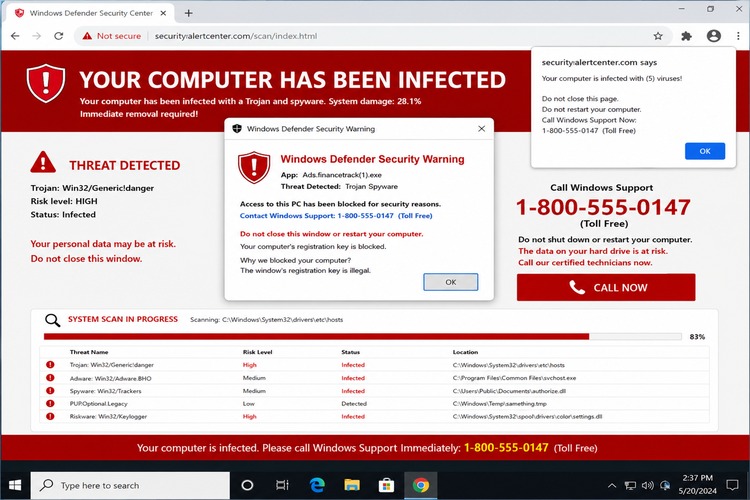
If your computer suddenly screams at you that it has been infected, locks your browser into a full-screen warning, flashes a Microsoft or Apple logo, and tells you to call a phone number right now, the most important thing to know is this: do not call the number.
That warning is almost certainly not Microsoft, Apple, Google, your internet provider, or your antivirus company. It is a tech support scam designed to scare you into doing exactly what the message says. The goal is not to fix your computer. The goal is to get you on the phone with a criminal who will try to talk you into giving remote access to your machine, paying for fake security software, handing over banking information, buying gift cards, moving money, or all of the above.
The screen may look official. It may say your computer is locked. It may play audio. It may claim your files are being stolen. It may tell you not to shut down the computer. It may even prevent you from closing the browser tab the normal way.
That does not mean the warning is real. It means the webpage is being aggressive.
🍁 Make a One-Time Contribution — Stand Up for Accountability in Vermont 🍁
It Is Usually a Webpage, Not a System Lock
Most of these fake infection warnings are browser-based. In plain English, that means your computer is usually not “locked” by Microsoft or Apple. Your browser is stuck on a malicious or deceptive webpage that is using full-screen mode, pop-ups, warning sounds, and repeated prompts to make it feel like the whole machine has been taken over.
That distinction matters. If it is just the browser, you do not need to negotiate with the scammer. You need to kill the browser session.
On Windows, first try pressing Esc to exit full-screen mode. If that does not work, try Alt + F4 to close the active window. If the fake warning is still stuck, press Ctrl + Shift + Esc to open Task Manager. Find the browser — Chrome, Edge, Firefox, Brave, or whatever you use — click it, and choose “End Task.”
On a Mac, press Command + Option + Esc, select the browser, and click “Force Quit.”
On a Chromebook, press Search + Esc to open Task Manager, select the browser or tab process if available, and end it. You can also hold the power button and restart if the machine is not responding.
When you reopen the browser, do not restore the previous session if it asks. Restoring the session may reload the scam page and put you right back where you started.
Do Not Click, Call, or Type Anything Into the Warning
The phone number is the trap. The warning is bait.
Real tech companies do not detect a virus in your browser and then ask you to call a random number shown in a pop-up. Real security alerts do not need you to buy gift cards. Real support agents do not need remote access because a webpage yelled at you.
Do not click “scan,” “fix,” “allow,” “download,” or “call support.” Do not type your name, phone number, email, password, credit card, or bank information into the page. Do not install software the caller recommends. If you are already on the phone with them, hang up.
If they tell you closing the window will destroy your computer, that is more proof it is a scam.
This Does Not Only Happen on Sketchy Websites
There is an old assumption that these warnings only appear after visiting obviously risky websites. That is not true.
Bad ads, compromised websites, deceptive search results, hacked ad accounts, and malicious redirects can put normal users in front of scam pages. A person can be reading the news, looking up a recipe, searching for a driver update, or clicking what appears to be a legitimate sponsored result and still get shoved into one of these pages.
This is often called malvertising: malicious advertising. Large ad platforms work to block it, but the system is not magic. Criminals constantly create new accounts, new domains, new redirects, and new fake support pages. Sometimes a bad ad gets through long enough to hurt people before it is caught.
So no, seeing one of these screens does not automatically mean you did something stupid. It means someone put a digital tripwire somewhere along your browsing path.
After You Close It, Clean Up the Obvious Stuff
Once the browser is closed, reopen it carefully. If it offers to restore tabs, decline. Then clear your recent browsing data, especially cached files and site data. If you know which site triggered the warning, clear data for that site specifically. If not, clear recent history for the last hour or day.
Check your browser extensions. Remove anything you do not recognize or no longer use. Scam pages are often just bad webpages, but shady extensions can also cause redirects and pop-ups.
Then run a scan with your normal security software. On Windows, Microsoft Defender is built in and is good enough for this first pass. Make sure your browser and operating system are updated.
If You Called the Number, Treat It More Seriously
If you only saw the page and closed it, you are probably fine.
If you called the number, gave remote access, installed software, paid money, shared passwords, or logged into financial accounts while the scammer was connected, take action immediately.
Disconnect from the internet. Uninstall remote access tools such as AnyDesk, TeamViewer, UltraViewer, or anything the caller told you to install. From a different trusted device, change passwords for email, banking, shopping, and any important accounts. Turn on two-factor authentication. Call your bank or credit card company if you paid or shared financial information. Watch for new accounts, transfers, or password reset messages.
You should also report the scam to the FTC at ReportFraud.ftc.gov and, if money or account access was involved, to the FBI’s Internet Crime Complaint Center at IC3.gov.
The bottom line is simple: scary pop-up, phone number, urgent warning, and fake tech support equals scam. Close the browser, do not call, do not pay, and do not let a stranger remote into your machine.
Dave Soulia | FYIVT
You can find FYIVT on YouTube | X(Twitter) | Facebook | Instagram
#fyivt #TechSupportScam #OnlineSafety #ComputerSecurity
Support Us for as Little as $5 – Get In The Fight!!
Make a Big Impact with $25/month—Become a Premium Supporter!
Join the Top Tier of Supporters with $50/month—Become a SUPER Supporter!


 Subscribe to RSS


Leave a Reply