

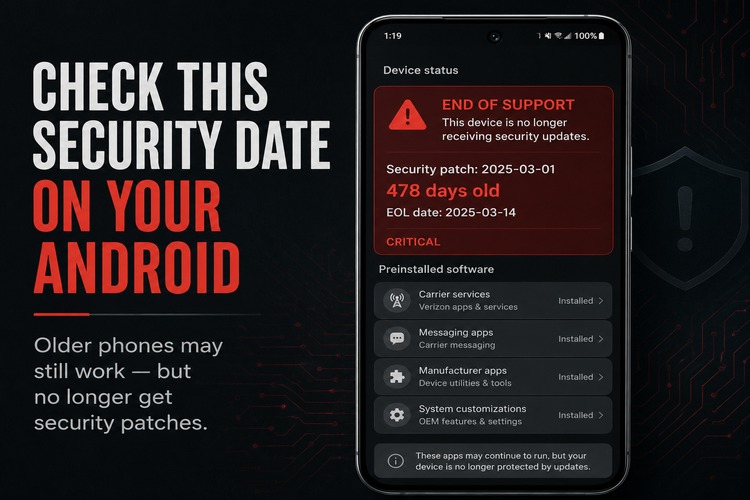
If you own an Android phone that is more than three or four years old, there is one date you should check this week.
Not the purchase date.
Not the warranty date.
The Android security patch date.
That date tells you whether your phone is still receiving security fixes from the companies responsible for maintaining it. And for a lot of Android users, especially people carrying older Samsung Galaxy, Motorola, Pixel, OnePlus, TCL, Nokia/HMD, or carrier-branded budget phones, the answer may not be what they assume.
This is not about whether the phone still works.
Many unsupported phones work fine. They make calls, send texts, browse the web, take good photos, run banking apps, and receive app updates. A premium Android phone from 2020 or 2021 can still feel like a strong device.
But “still works” is not the same as “still supported.”
🍁 Make a One-Time Contribution — Stand Up for Accountability in Vermont 🍁
Start Here: Phones To Check Immediately
This is an Android-wide issue, not just a Samsung issue. But Samsung gives a useful example because Galaxy phones are common, expensive, and often kept for years.
If you have a Galaxy S20, S20+, S20 Ultra, Note20, Note20 Ultra, Galaxy S21, S21+, S21 Ultra, or an older Galaxy S or Note model, check your security patch date now.
The main Galaxy S20 line reached the end of Samsung’s update schedule after its March 2025 security patch. The Galaxy S21 line has also begun aging out of regular support, depending on model and variant. The Galaxy S21 FE is a different case because it launched later. The Galaxy S22 series is newer, but owners should still check because devices often move from monthly updates to quarterly updates before support ends.
Pixel owners have a different timeline. Pixel 8 and newer phones are in Google’s seven-year support era. Pixel 6 and Pixel 7 models also received extended support. But Pixel 5 and older devices deserve a closer look.
Motorola and lower-cost Android phones can be even harder to generalize. Some budget models receive fewer years of security support than flagship phones. Carrier-branded Android phones can also vary by exact model.
The practical rule is simple: if your Android phone was released in 2021 or earlier, check it. If it is running Android 12 or older, check it. If you bought it used, refurbished, discounted, or “new old stock,” check it.
How To Find The Date
The exact path varies by phone, which is part of the problem.
On many Android phones, the patch date is under something like:
Settings → About Phone → Software Information → Android Security Patch Level
But Android menus are not identical across Samsung, Pixel, Motorola, OnePlus, and carrier-customized phones.
A better method is to open Settings and use the search box.
Search for:
“security patch”
“Android security”
“software information”
“system update”
“security update”
You are looking for a field called Android security patch level, Security patch level, or something similar.
If the date is recent — usually within the last month or two, sometimes a little longer depending on the manufacturer’s update schedule — the phone is likely still receiving updates.
If the date is many months old, it is time to look up the exact model and support status.
Do not rely only on the marketing name. “Galaxy S21” is useful, but the model number is better. Carriers and variants can matter.
Why App Updates Can Fool You
A phone can look current even when it is not fully supported.
Apps may still update through the Google Play Store. Google Play Protect may still scan for suspicious apps. Chrome or another browser may still receive updates. Some Google Play system components may still update.
That is all good.
It is also not the same thing as the manufacturer continuing to patch the phone’s operating system, firmware, drivers, modem software, and device-specific security problems.
That is where many users get misled.
They see apps updating and assume the phone is maintained. In reality, one layer may still be receiving updates while another layer has stopped.
The phone does not necessarily make that distinction clear.
The Risk Is Accumulated, Not Instant
An unsupported Android phone is not automatically compromised.
The day security support ends is not the day the phone becomes unsafe.
The risk builds over time.
Security patches fix flaws discovered in Android, wireless components, media processing, chipsets, manufacturer apps, carrier builds, and other parts of the device. When a phone is supported, those fixes can be delivered. When support ends, new flaws may remain unpatched on that model.
That matters because phones are no longer just phones.
They hold banking apps, email, two-factor authentication codes, photos, location history, medical messages, passwords, payment apps, and private conversations.
A working phone can still be a risky phone if the software underneath it is no longer being maintained.
What To Do If Your Phone Is Out Of Support
Do not panic-buy a phone.
Do take it seriously.
Check the patch date. Look up the exact model. Review app permissions, especially location, microphone, camera, contacts, and text messages. Remove apps you no longer use. Disable carrier or manufacturer software you do not need, where Android allows it. Keep browsers and apps updated. Avoid random APK installs. Be more cautious about banking, primary email, and authentication apps on a device that is far outside support.
And start planning a replacement timeline.
The point is not that every old Android phone is dangerous.
The point is that users should not have to discover end-of-life by accident.
Dave Soulia | FYIVT
You can find FYIVT on YouTube | X(Twitter) | Facebook | Instagram
#fyivt #AndroidEOL #AndroidSecurity #DigitalHygiene
Support Us for as Little as $5 – Get In The Fight!!
Make a Big Impact with $25/month—Become a Premium Supporter!
Join the Top Tier of Supporters with $50/month—Become a SUPER Supporter!


 Subscribe to RSS





Leave a Reply